28 October 2026 · Orbit Multiprint
What happens after you order: the Orbit job card journey
Every order runs on one job card owned by a named person, from file check to signed challan. Here is each step and what it means for you.
Most printing problems are not printing problems. They are handover problems: a finish forgotten between two people, a file approved by nobody, a parcel that left without the challan. We fixed that by giving every order one job card that follows it from confirmation to dispatch, owned by one named person, with every step ticked before the next can begin. This is what happens to your order after you press confirm, and what each step means for you.
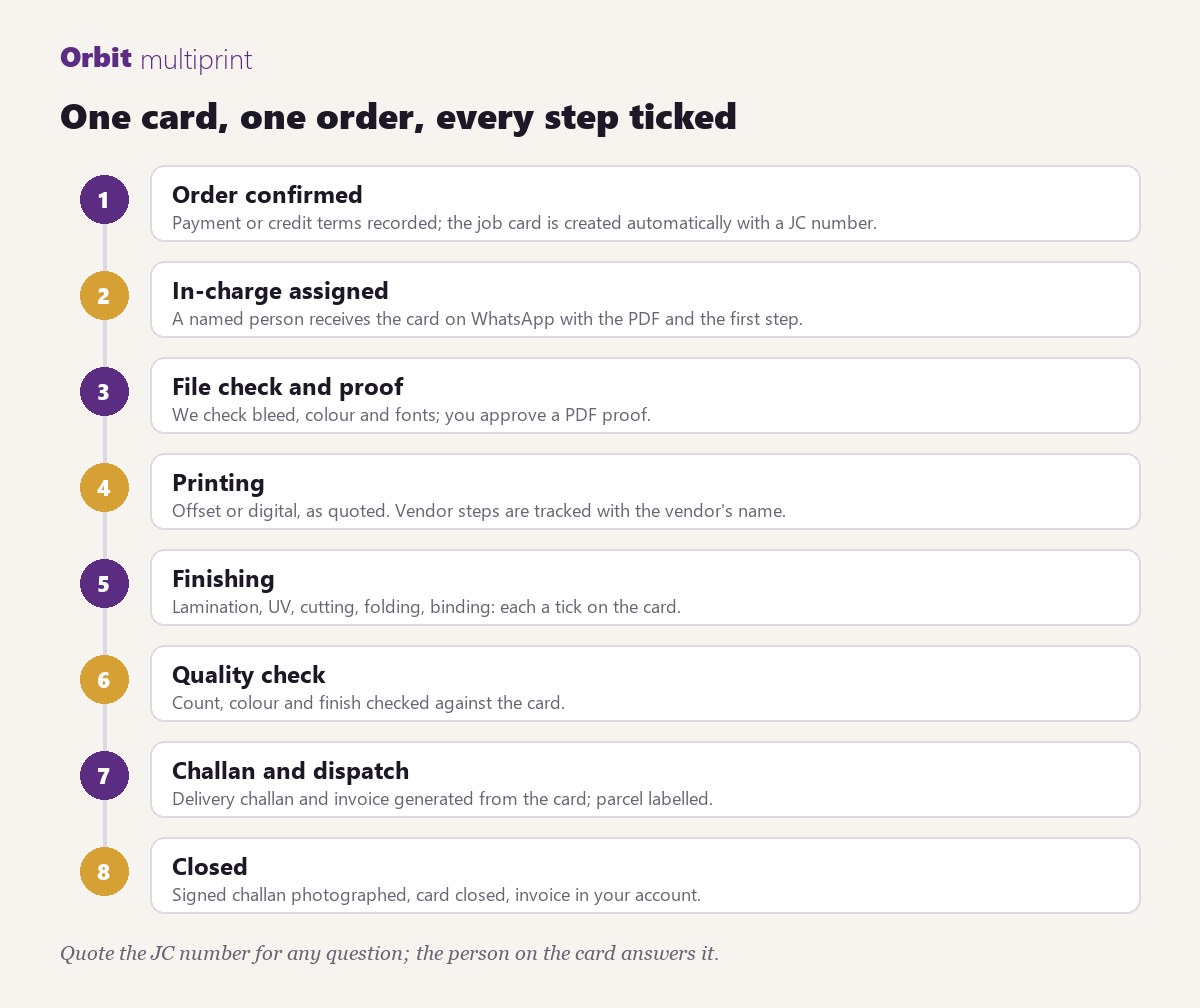
1. The order is confirmed and the card is created
When payment is received, or when credit terms or an advance are agreed, a job card is created automatically and given a JC number. The card records what you ordered, the paper and size, the finishes, the quantity, the due date, how it will be delivered and the payment terms. The JC number is the reference for everything that follows; it is on your order page and on every message we send about the job.
2. A named in-charge receives it
The card is assigned to one person and sent to their WhatsApp as a PDF, together with the first step to complete. That person is responsible for the job until it is closed. If they are away, the card is reassigned, not left waiting.
3. File check and proof
We check your artwork for bleed, safe zones, colour mode, resolution and fonts, and send you a PDF proof. Nothing prints until the proof is approved, because the proof is the cheapest place to catch a mistake. If you asked us to design, the proof is where you see the layout. Corrections go back on the same message thread.
4. Printing
The job runs on the press the quote specified, offset or digital. If a step is done by a specialist vendor, say a foil stamper or a binder, the vendor's name is on the card and the step is tracked the same way as an in-house one.
5. Finishing
Lamination, spot UV, foil, creasing, folding, cutting, binding, pasting: each is a separate step on the card with its own tick. The person doing the work ticks it on WhatsApp when it is done. This is why a spot-UV card does not leave without its UV.
6. Quality check
Count, colour and finish are checked against the card before packing. A short run is counted by hand; long runs are weighed and sampled.
7. Challan and dispatch
The delivery challan, the shipping slip and, where applicable, the parcel sticker are generated from the card, and only once every step is ticked. If a balance is due at dispatch, the card asks for it at this point, by UPI QR, link or cash, and a paid order is released without any further question. Ahmedabad and Pune deliveries go by our own staff; the rest of India goes by courier with a tracking number.
8. Closed
The signed challan is photographed and attached, the invoice is in your account, and the card is closed. The record stays, so a reorder months later uses the same specification.
What this means for you
- One number to quote. Any question, quote the JC number and the person on the card answers it.
- No surprises at dispatch. The money terms are on the card from day one.
- Reorders that match. The specification is on record, including the paper lot and the finishes.
- Visible delays. If a step runs late, the card says so and the owner is alerted, so you hear from us before you have to ask.
Who answers what
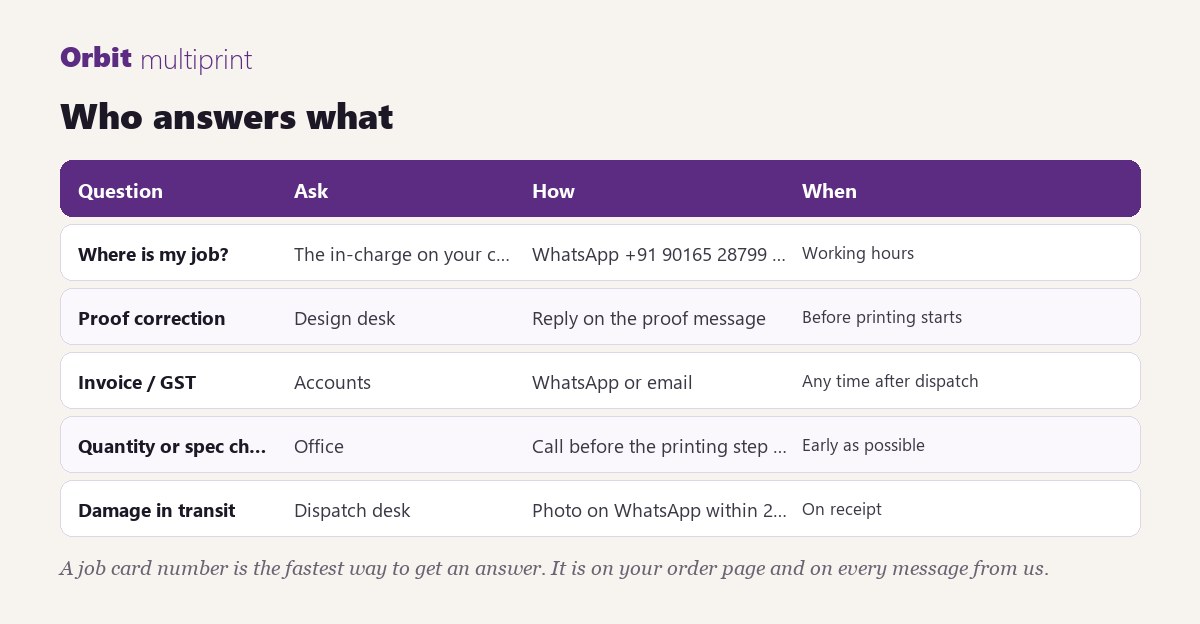
For status, message WhatsApp +91 90165 28799 with the JC number. For proof corrections, reply on the proof message. For invoices and GST, the accounts desk. For a change of quantity or specification, call before the printing step is ticked; after that the change becomes a new job.
Why we work this way
We print thousands of jobs a year across visiting cards, brochures, packaging, diaries, calendars and files. At that volume, memory does not scale and verbal instructions get lost between shifts. The job card is boring on purpose: it is a checklist that no one can skip, and it is the reason a job ordered on WhatsApp at 9 pm comes out exactly as specified.
Place an order from any product page, use the price calculator for a custom specification, or send the job to WhatsApp +91 90165 28799. The job card starts the moment it is confirmed.