28 October 2026 · Orbit Multiprint
GST on printing: what your invoice shows and how to claim credit
How prices are shown with and without GST, what appears on an Orbit tax invoice, and the steps a registered business follows to claim credit.
"Is this price with GST or without?" is asked on almost every business order, and the answer changes how a quote is compared. This post explains how prices are shown on orbitmultiprint.com, what appears on an Orbit tax invoice, and what a GST-registered business needs to do to claim the credit on its printing. It describes how our billing works; it is not tax advice, and your chartered accountant decides what you claim.
With GST or without: how our prices are shown
- Retail prices on the website include GST. The figure you see on a product page is the figure you pay, and the invoice shows the taxable value and the tax inside it.
- Trade accounts see prices before GST. Registered businesses, resellers and regular B2B buyers are set up on a trade group that displays the ex-GST price, with GST added at checkout so the tax line is visible for accounting.
- Quotes on WhatsApp and the calculator state which they are. If a quote does not say, ask; we will always confirm.
Most of our printed products and printing services carry GST at 18 percent, which is why a quote of 1,000 before tax becomes 1,180 on the invoice.
What is on an Orbit tax invoice
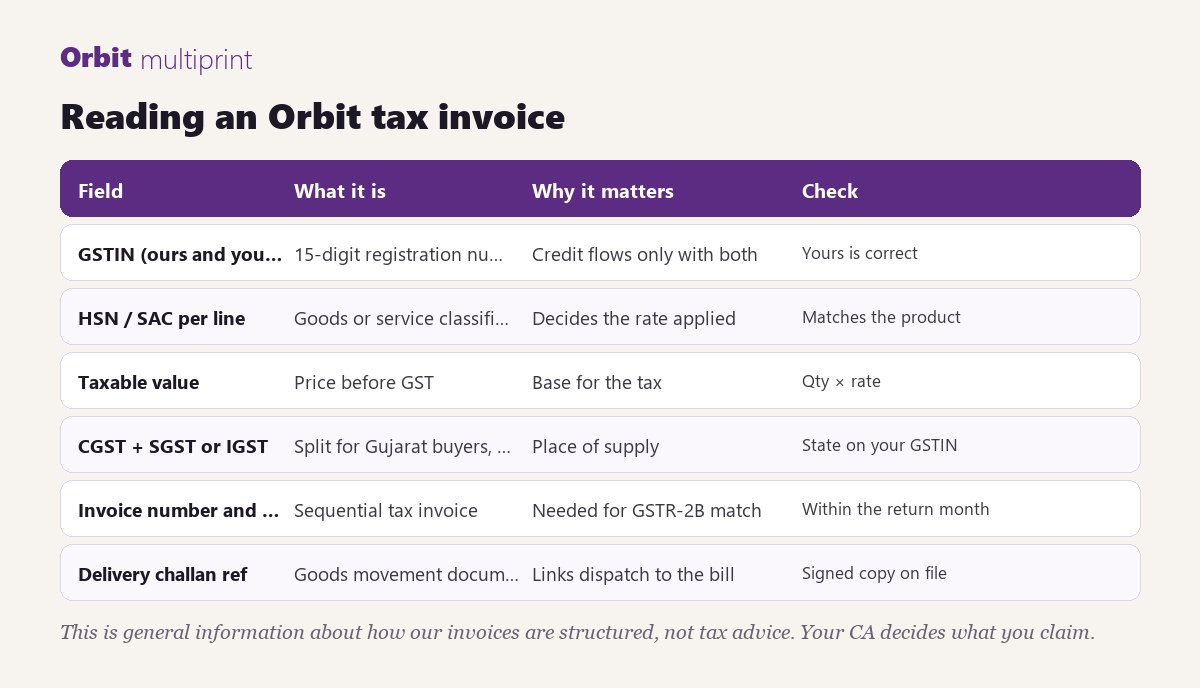
- Our GSTIN and yours. Both must be on the invoice for your credit to flow. Add your GSTIN to your account or tell us before billing; adding it after the invoice is issued means a revised document.
- HSN or SAC code per line. Printed products such as visiting cards, brochures and leaflets are classified under the printed-matter headings (commonly 4911); diaries and registers under paper stationery (4820); printing done as a service on your material under the printing services code (9989). The code on the line tells your accountant how the item was treated.
- Taxable value. Quantity multiplied by the unit rate before tax. Our unit rates are stored before GST and the line total includes it, so the two figures reconcile.
- CGST and SGST, or IGST. For a buyer registered in Gujarat the tax splits into central and state halves. For a buyer in another state it is charged as IGST. The split follows the state in your GSTIN, which is why a Pune buyer with a Gujarat GSTIN sees CGST and SGST.
- Invoice number and date. A sequential tax invoice number. The month on the invoice is the month in which it appears against your GSTIN.
- Delivery challan reference. Where goods moved under a challan, the number is on the invoice and the signed copy is on our file.
How a registered business claims the credit
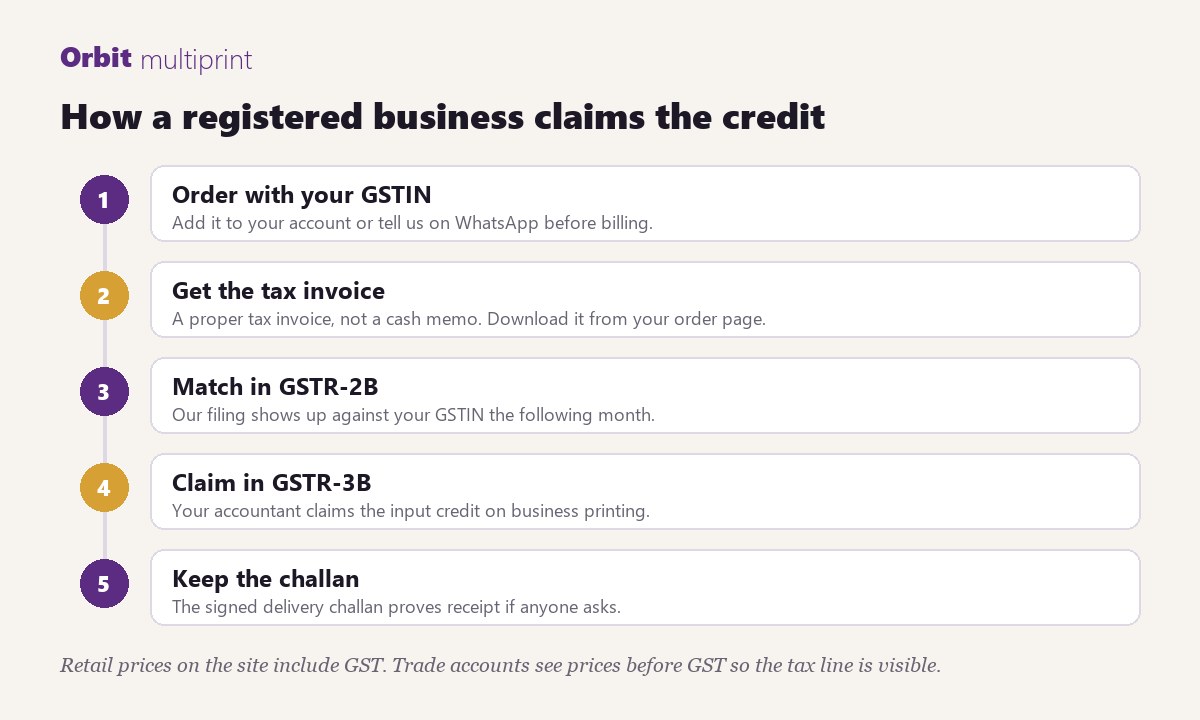
1. Order with your GSTIN on the account. 2. Receive the tax invoice. Download it from the order page in your account at any time. 3. Our return shows the invoice against your GSTIN in the following month's statement. 4. Your accountant claims the input credit on business printing in the regular return. 5. Keep the signed delivery challan with the invoice; it proves receipt if there is ever a query.
Printing bought for the business (stationery, marketing material, packaging, diaries for staff) is ordinarily creditable; printing bought as gifts for customers may be treated differently. Your CA is the right person to ask.
Proforma, challan and invoice: which document is which
- Proforma invoice: a priced document issued before payment or dispatch so you can raise a purchase order or release an advance. It is not a tax invoice and carries no credit.
- Delivery challan: a goods-movement document that travels with the parcel and is signed on receipt. Not a bill.
- Tax invoice: the bill. The only document that carries input credit.
Every Orbit order can have all three. If you only need a cash memo for a small walk-in job, say so and we will bill it that way.
White-label and reseller orders
Resellers who print through us for their own clients are billed by Orbit to the reseller, with the reseller's GSTIN. The end customer receives no Orbit document. Your own invoice to your client is yours to raise; we never send paperwork to your customer.
Corrections
A wrong GSTIN, a wrong state or a quantity change after billing is corrected by a revised invoice or a credit note, not by editing the original. Tell us within the month so the correction lands in the same return period.
Questions about an invoice go to WhatsApp +91 90165 28799 with the order or job card number. For trade pricing on regular business printing, ask for a trade account when you enquire.